
A supplier can send a phone number as part of a longer value, for example Phone: +1 (415) 555-0198 ext. 24. In value settings, you can find the number with a regular expression, keep the matched fragment, and then normalize it.
The rule is available in value transformations for XML, JSON, and table sources. You can type the regular expression manually or choose a preset with the star button next to the pattern field.
Choose a regular expression from presets
For phone extraction, use the regular expression condition and the remove all except action. This action keeps the full matched fragment and removes the text around it.
- Open the value settings for the phone field.
- Add a rule and select the
regular expressioncondition. - Click the star button and choose a phone preset.
- Select
remove all exceptas the action and save the rule.

Option 1: keep the matched phone number
Use this when you need to remove text around the phone number but keep the number formatting from the source.
| Before | Rule | After |
|---|---|---|
Contact: +1 (415) 555-0198 ext. 24 | \+?\d[\d\s().-]{8,}\d + remove all except | +1 (415) 555-0198 |
phone 1 212 555 0104 | \+?\d[\d\s().-]{8,}\d + remove all except | 1 212 555 0104 |
Option 2: normalize the number
If you need one leading plus sign, use a three-rule sequence: first keep the matched phone number, then remove every non-digit character with the regular expression \D+, and then add + at the beginning when the current value is not empty.
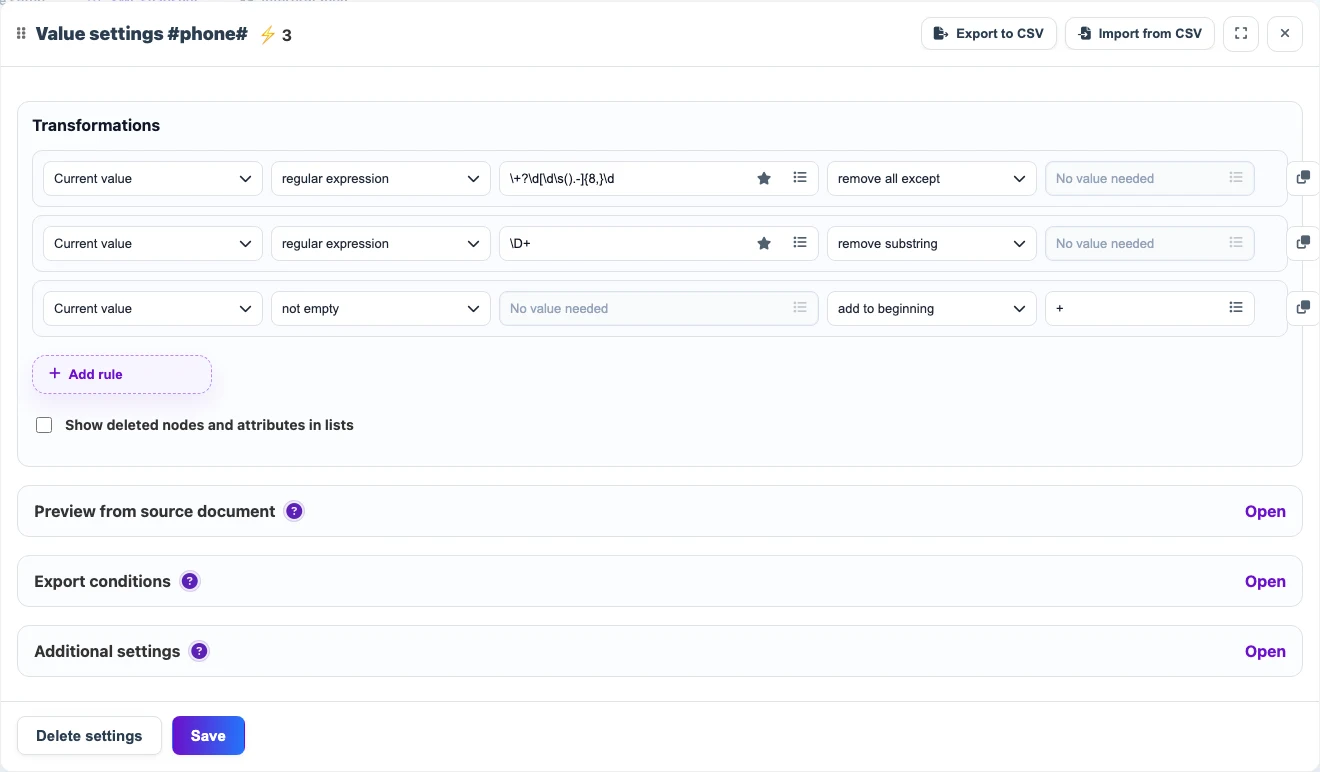
| Before | Sequence | After |
|---|---|---|
Phone: +1 (415) 555-0198 ext. 24 | keep phone → remove \D+ → if the current value is not empty, add + | +14155550198 |
1 212 555 0104 | keep phone → remove \D+ → if the current value is not empty, add + | +12125550104 |
Important details
remove all exceptkeeps the first full match. It does not collect every digit one by one.- To normalize the number to digits, use the regular expression
\D+with theremove substringaction. - If you need country-code-specific normalization, add that rule before the final
+step.