
A barcode should usually be stored as text, not as a number: otherwise a leading zero can be lost. A regular expression helps extract an EAN or UPC from a supplier value and remove labels such as EAN: or barcode.
For barcodes, use the regular expression condition and the remove all except action. If the barcode contains spaces or dashes, remove those separators with separate rules first, then check the length.
Extract the barcode from a value
In this example, the rule keeps a sequence of 12-14 digits or an EAN-8 code. The order matters: put longer alternatives first so an EAN-13 is not cut to the first 8 digits.
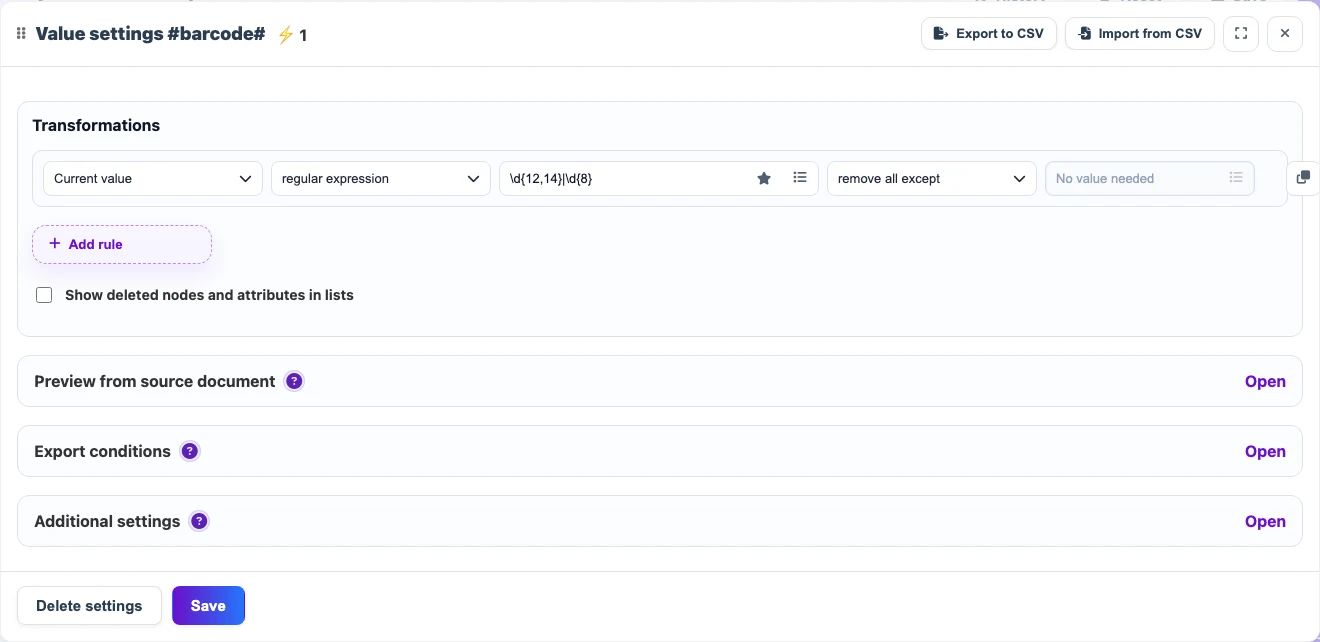
| Before | Rule | After |
|---|---|---|
EAN: 4006381333931 | \d{12,14}|\d{8} + remove all except | 4006381333931 |
barcode 012345678905 | \d{12,14}|\d{8} + remove all except | 012345678905 |
Useful patterns
| Type | Pattern | Use when |
|---|---|---|
| EAN-13 | \b\d{13}\b | The source must contain exactly 13 digits. |
| UPC-A | \b\d{12}\b | For 12-digit barcodes. |
| EAN-8 | \b\d{8}\b | For short 8-digit codes. |
| Several lengths | \d{12,14}|\d{8} | The source can send different lengths. |
Important details
- Do not convert a barcode to a number when leading zeroes are possible.
- If spaces or dashes appear between digits, remove separators first and then check the length.
- To reject invalid codes, add export conditions or a
do not loadrule for values that do not match the required pattern.